1.2 Graphing Quantitative Data
Section Overview
- Example 1.2.1
- Interactive 1.2.1 - Example 1.2.1
- Example 1.2.2
- Interactive 1.2.2 - Example 1.2.2
- Example 1.2.3
- Gallery 1.2.1 - Example 1.2.3
- Pop Quiz 1.2.1
Describing Qualitative Data
Categorical data is important in its own right, but there are generally a lot more things you can do with quantitative data. The following types of measures are primarily what we use to describe distributions of qualitative data:
- Shape — One way we can describe a distribution’s shape is through its symmetry. A distribution can be symmetric, which means the data points, or observations, are equally concentrated on both sides of the median. In other words, both sides are mirror images of one another. Otherwise, the distribution is either right-skewed (the observations are more closely concentrated on the left side of the median than on the right) or left-skewed (the observations are more closely concentrated on the right side of the median than on the left).
Another description of shape is the number of peaks a distribution has. Distributions with one peak, two peaks, or many peaks are called unimodal, bimodal, and multimodal respectively. The mode of the distribution is its highest peak.
- Center — Although there are measures of center that we’ll discuss in later sections, one important measure of center is the median, or the point in the distribution where half of the data in the distribution is smaller and the other half of the data is larger. If the observations are numbered from least to greatest, then the median can be more easily picked out. Further, if the distribution has an odd number of observations, then the median is the observation in dead center. If the distribution has an even number of observations, then the median is the average of the two “innermost” observations.
- Spread — One common measure of center is the range, or the numerical value that comes from taking the difference between the largest observation and the smallest observation. Similarly to the center of a distribution, there are additional measures of spread that we’ll discuss in sections to come.
- Unusual Features — We can also describe a distribution in terms of clusters (observations closely grouped together) and gaps (areas of empty space in a distribution). Lastly, we have outliers, data points that differ greatly from most of the other data points in a distribution, usually lying on the outer reaches of the graph (see what we did there?) Although our eyes can help us identify potential outliers, we won’t know until the next section if these extreme observations actually fit the bill.
Dotplots
One way to graph a distribution is to create a dotplot, a graph where the observations are represented by dots and are placed over their numerical values displayed on the bottom axis. See Interactive 1.2.1 for a better idea of what a dotplot looks like. With that said, let’s dive into the example problem that accompanies this dotplot:
Interactive 1.2.1 Example 1.2.1
Example 1.2.1 — recorded solution
a) Shape: Looking at the dotplot, we see that the distribution is bimodal with peaks at 1 goal and 4 goals, with 1 being the mode. The distribution is also right-skewed, with most of the observations located near 0.
b) Center: There is an even number of soccer games played, so the median will be the average of the two innermost observations. The dotplot automatically orders the observations from least to greatest, so we simply count up to the 12th observation, 3 goals. The other innermost observation is the 13th observation, 4 goals. The number between these two values is the median, with a value of 3.5 goals.
c) Spread: The range of the distribution is the the difference between the largest observation and the smallest observation, or
d) Unusual features: Most of the values are clustered near the first half of the graph, leaving a gap between the cluster and the observations with a value of 9 and 10. These values could also be potential outliers.
Stemplots
We can also use stemplots, also called stem-and-leaf plots, to graph distributions. At first glance, a stemplot looks a bit like a dotplot turned on its side, but with the numerical values of the observations themselves populating the graph instead of dots. The stem in the stemplot consists of every digit from a distribution’s observations save for the smallest one, which make up the leaves, ordered from least to greatest. Any well-made stemplot should also include a key that lets other people know what the stems and leaves represent. This is especially important when your observations consist of non-integer values.
Stemplots are also ideal for comparing two distributions. These types of graphs are called back-to-back stemplots. An example of a back-to-back stemplot can be seen in Interactive 1.2.2.
Interactive 1.2.2 Example 1.2.2
| Waterwolf leaves | Stem | Net Navigator leaves |
|---|---|---|
| 8 | 1 | |
| 8 6 | 9 | |
| 0 | 10 | |
| 8 6 6 2 | 11 | |
| 6 5 5 3 2 1 | 12 | 3 4 8 |
| 7 5 4 | 13 | 0 7 |
| 2 0 | 14 | 2 6 9 |
| 3 | 15 | 2 3 7 7 |
| 16 | 1 4 4 5 6 9 |
Example 1.2.2 — recorded solution
a) Shape: When you create a stemplot for the values in the table, it is apparent that the Waterwolf distribution is roughly symmetric and unimodal with its peak located at the 120 ms mark. The Net Navigator distribution, is left-skewed and also unimodal, with its peak located at the 160 ms mark.
b) Center: There is an odd number of observations for both distributions, so the median will be in dead center. When the observations for each distribution are ordered from least to greatest, we find the median for the Waterwolf distribution to be 123 ms and the median for the Net Navigator distribution to be 152 ms.
c) Spread: The range for the Waterwolf distribution is and the range for the Net Navigator distribution is .
d) Unusual features: Most of the values for the Waterwolf distribution are clustered around the middle of the graph, while most of the values for the Net Navigator distribution are clustered around the bottom of the graph. There are no notable gaps or potential outliers for the Waterwolf distribution. For the Net Navigator distribution, however, there is a gap between the cluster of values and the potential outlier, the 81 ms observation.
Histograms
The last type of graph we’ll cover in this section are histograms. Histograms look similar to bar graphs, but are used for quantitative variables instead of categorical variables. Each bar in a histogram represents a class, or an equal subdivision of the distribution’s range. The number of classes you choose for your histogram depends on how large you decide to make each class. There is no exact formula for picking the size or number of classes, however. Pick too many or too few classes, and it could result in you or others having a hard time interpreting the distribution, especially without the original data set to rely on. When you pick your class size, you can display the count or percent of the observations that fall within each class in either a frequency table or relative frequency table.
Gallery 1.2.1 Example 1.2.3
Frame 1 of 4
The frequency table showing the number of children in each class Open full-size image S0028Frame 2 of 4
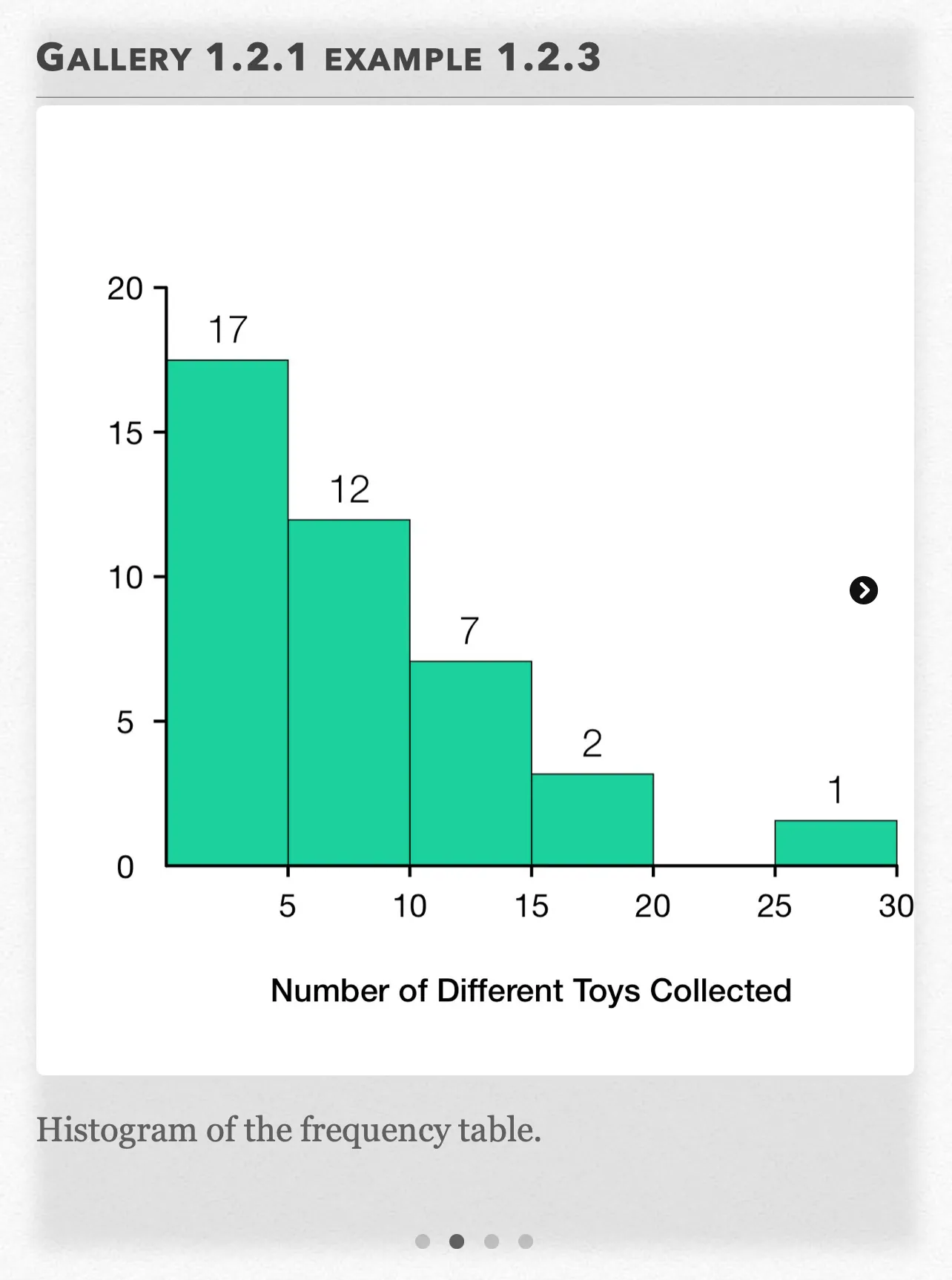
Histogram of the frequency table. Open full-size image S0029Frame 3 of 4
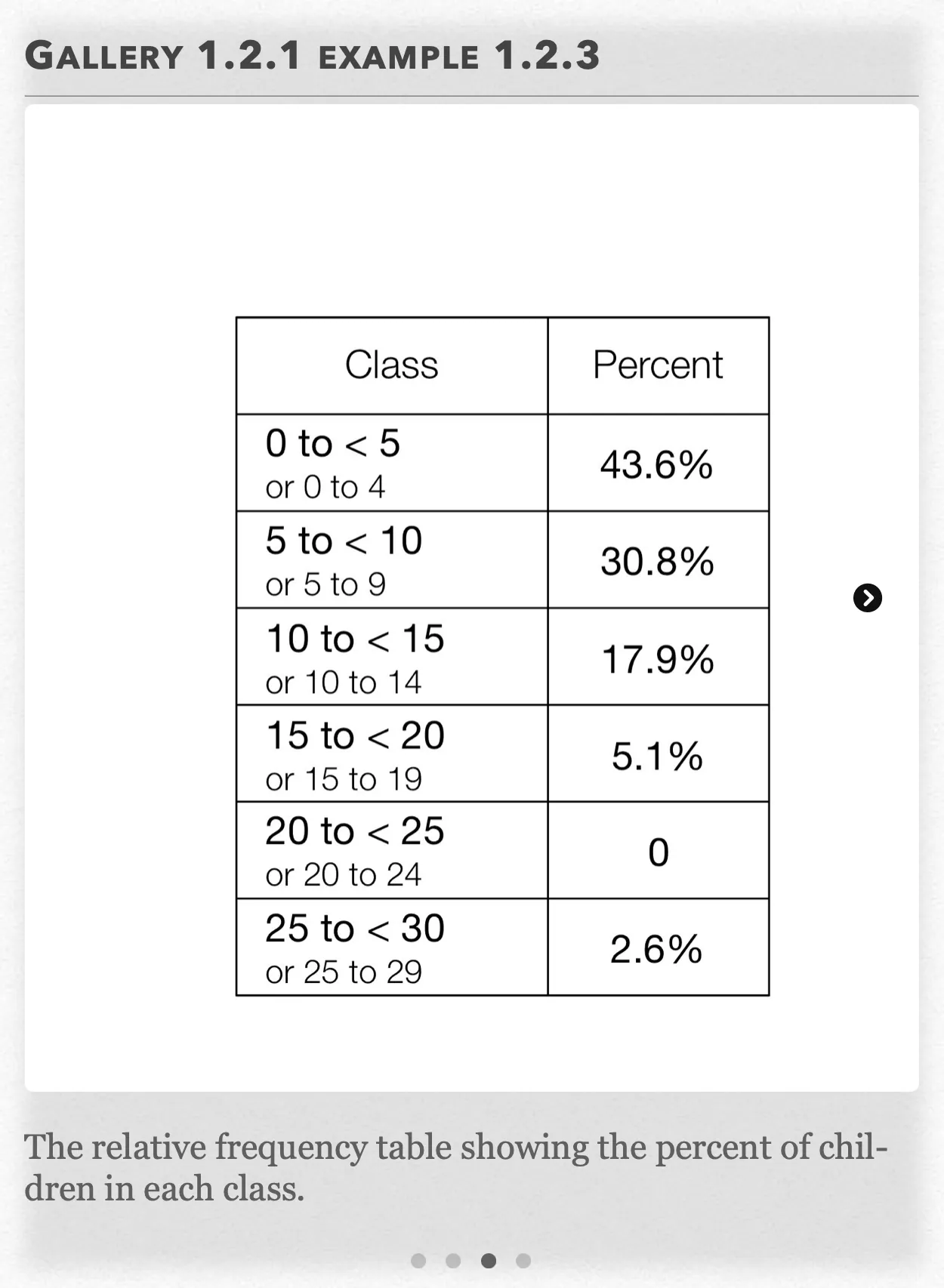
The relative frequency table showing the percent of children in each class. Open full-size image S0030Frame 4 of 4
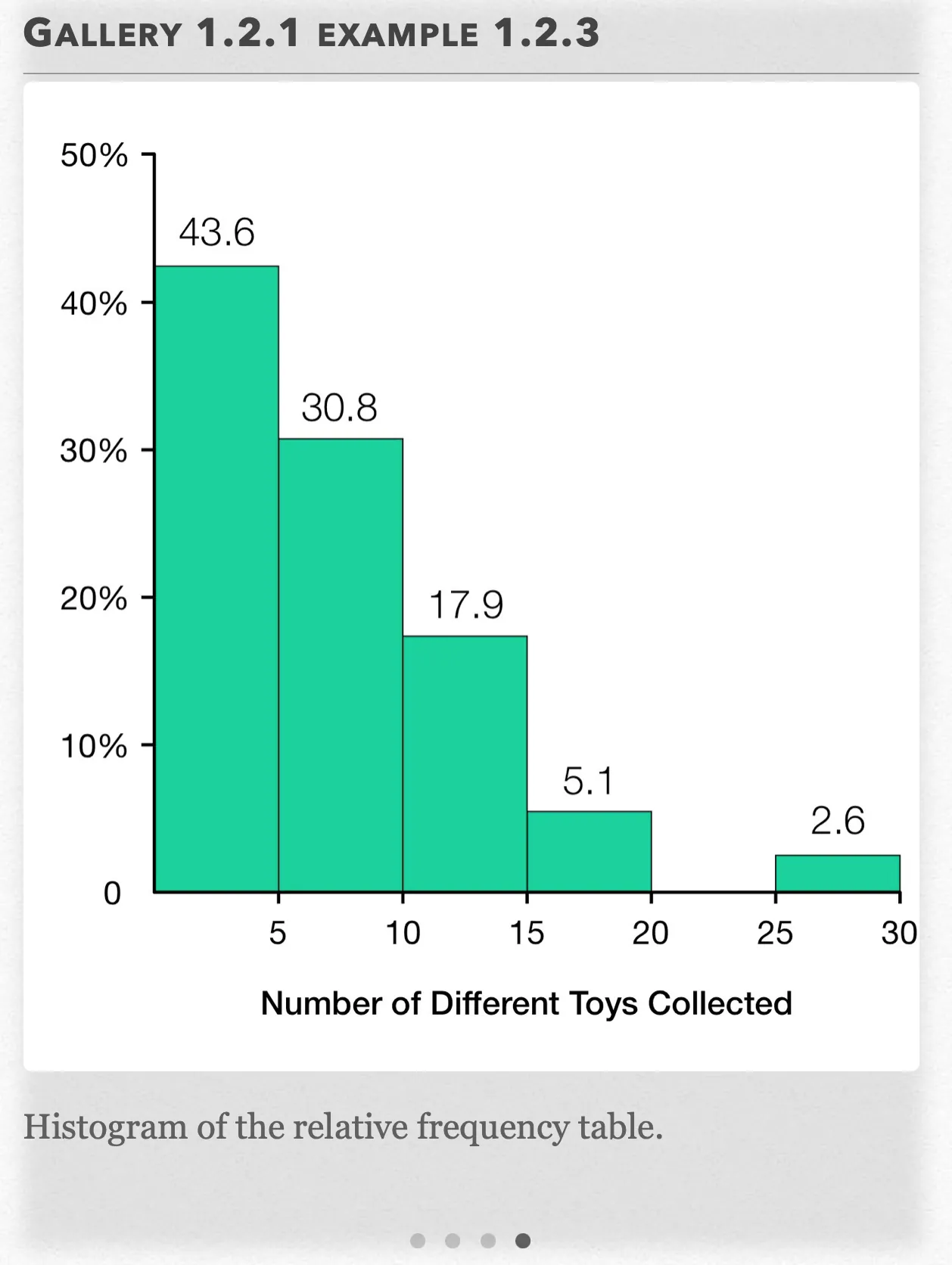
Histogram of the relative frequency table. Open full-size image S0031
Capture provenance
Filename capture times, with no recorded timezone. Frames above follow the original gallery positions.
- · S0028 · displayed frame 1
Screenshot 2026-10-05 at 3.38.45 PM.png - · S0029 · displayed frame 2
Screenshot 2026-10-05 at 3.38.51 PM.png - · S0030 · displayed frame 3
Screenshot 2026-10-05 at 3.38.55 PM.png - · S0031 · displayed frame 4
Screenshot 2026-10-05 at 3.39.01 PM.png
| Class | Count |
|---|---|
| 0 to < 5 or 0 to 4 | 17 |
| 5 to < 10 or 5 to 9 | 12 |
| 10 to < 15 or 10 to 14 | 7 |
| 15 to < 20 or 15 to 19 | 2 |
| 20 to < 25 or 20 to 24 | 0 |
| 25 to < 30 or 25 to 29 | 1 |
| Class | Percent |
|---|---|
| 0 to < 5 or 0 to 4 | 43.6% |
| 5 to < 10 or 5 to 9 | 30.8% |
| 10 to < 15 or 10 to 14 | 17.9% |
| 15 to < 20 or 15 to 19 | 5.1% |
| 20 to < 25 or 20 to 24 | 0 |
| 25 to < 30 or 25 to 29 | 2.6% |
Example 1.2.3 — recorded solution
Before creating a histogram, we have to decide on the size and number of our classes. With a size of 5, we could have a total number of 6 classes: 0 to 5, 5 to 10, 10 to 15, 15 to 20, 20 to 25, and 25 to 30. However, notice that the classes are actually a size of 6 if you include the first and last numbers.
We can either change the names of the classes to be:
0 to < 5, 5 to < 10, 10 to < 15, 15 to < 20, 20 to < 25, and 25 to < 30, or
0 to 4, 5 to 9, 10 to 14, 15 to 19, 20 to 24, and 25 to 29
Once we have decided on our size and number of classes, we have to record the counts or percents of observations out of the total that fall under each class.
We can do this in either a frequency table or relative frequency table.
After we have created our frequency table of choice, we can create our histogram. The widths of each bar are equal, since they are based on the class size. The height of each bar graph is the count or percent of each class.
a) Shape: The graph is right-skewed and unimodal with its peak located at the 0 to < 5 class.
b) Center: 39 is an odd number of observations, so the median will be in dead center. When the observations for each distribution are ordered from least to greatest, we find the median for the distribution to be the 20th observation, or the one where the child has 5 toys collected.
Even if we don’t have the original data set, if the 0 to < 5 class class has 17 (or 43.6%) observations and the 5 to < 10 class has more than the 3 (or 6.4%) observations remaining to reach the median, the median would still fall somewhere in the 5 to < 10 class.
c) Spread: The range for the distribution is .
d) Unusual features: There is a small gap between the cluster at the left side of the graph where the majority of the observations are found and the potential outlier of 28 toys collected.
To better visualize this example problem, refer to Gallery 1.2.1
Pop Quiz 1.2.1
Glossary and deeper reading · 14 refreshers
These editorial refreshers supplement the reading. Definitions and examples are added guidance; original source wording and recorded answers remain in their original context.
-
Quantitative variable
A quantitative variable records a numerical count or measurement for each individual. Differences between its values have a meaningful numerical interpretation. For example, the number of books borrowed and the mass of a backpack are quantitative variables.
Read more: Quantitative variable in the captured Statistics reading →
-
Distribution of data
A distribution describes the values a variable takes and how often those values occur. For quantitative data, useful features include shape, center, spread, and unusual observations. For example, a distribution of commuting times shows which times are common and how widely they vary.
-
Symmetric distribution
A symmetric distribution has approximately matching shapes on either side of its center. Symmetry alone does not establish that a distribution is Normal. For example, a uniform distribution over a centered interval is symmetric but has a flat rather than bell-shaped density.
-
Observation
An observation is a recorded value or set of values for an individual or occasion. The individual may be a person, object, or event rather than a human subject. For example, one plant’s measured height is an observation in a plant-growth study.
-
Unimodal distribution
A unimodal distribution has one main peak. The peak marks a region where observations or probability are especially concentrated. For example, a histogram of heights might have one prominent peak around the most common height interval.
-
Bimodal distribution
A bimodal distribution has two main peaks. Two peaks can suggest different groups, but the graph alone does not establish their cause. For example, combining commute times from nearby and distant neighborhoods may produce two peaks.
-
Median
The median is the middle of an ordered numerical data set. For an even number of observations, it is the average of the two middle values under the usual convention. For example, the median of 2, 4, and 20 is 4.
-
Range of data
The range of a data set is its maximum value minus its minimum value. It measures spread and is sensitive to extreme observations. For example, values from 3 to 11 have a range of 8.
Read more: Range of data in the captured Statistics reading →
-
Outlier
An outlier is an observation unusually far from the overall pattern. The 1.5-IQR rule flags possible outliers below the first quartile minus 1.5 IQR or above the third quartile plus 1.5 IQR. For example, a very long commute may be flagged for investigation without automatically being a recording error.
-
Dotplot
A dotplot places a dot for each observation above its numerical value. Repeated values are usually shown by stacking dots. For example, three observations equal to 4 produce a stack of three dots above 4.
-
Stemplot
A stemplot splits each numerical observation into a stem and a leaf. A key specifies the place values, so the original observations can be recovered. For example, a key of 3 | 7 = 37 means that stem 3 with leaf 7 represents 37.
-
Back-to-back stemplot
A back-to-back stemplot compares two data sets using shared stems. Leaves for one group go on one side and leaves for the other group go on the opposite side. For example, two classes’ test scores can be compared while retaining their individual values.
-
Bar graph
A bar graph uses separate bars to compare category counts or proportions. The bar lengths or heights encode the values, and category order need not be numerical. For example, separate bars can compare the number of votes for three lunch options.
-
Categorical variable
A categorical variable records a group or label for each individual. Numeric labels still count as categories when arithmetic on them has no meaningful interpretation. For example, favorite school subject is categorical, even if each subject receives a numbered code.
Read more: Categorical variable in the captured Statistics reading →